← CasosCases

Caso de estudio · UX/UI + React Native + QACase study · UX/UI + React Native + QA

Chilexpress: rediseño del login y la autenticación de la appChilexpress: redesigning the app's login and authentication

Un recorrido completo: arquitectura en blanco y negro, wireframe de baja fidelidad, diseño en alta fidelidad con la marca, investigación con usuarios, desarrollo en React Native con backend Node.js y pruebas automatizadas en Firebase Test Lab.

The full journey: black-and-white architecture, low-fidelity wireframe, high-fidelity branded design, user research, React Native development with a Node.js backend and automated tests on Firebase Test Lab.

Wireframe→High-Fidelity→Investigación UXUX research→React Native→Firebase Test Lab
ClienteClient

Chilexpress

RolRole

UX/UI + Frontend

UX/UI + Frontend

PlataformaPlatform

App móvil Android

Android mobile app

Stack

Figma · React Native 0.74 · TypeScript · Node.js · Firebase

1

Arquitectura en blanco y negroBlack-and-white architecture

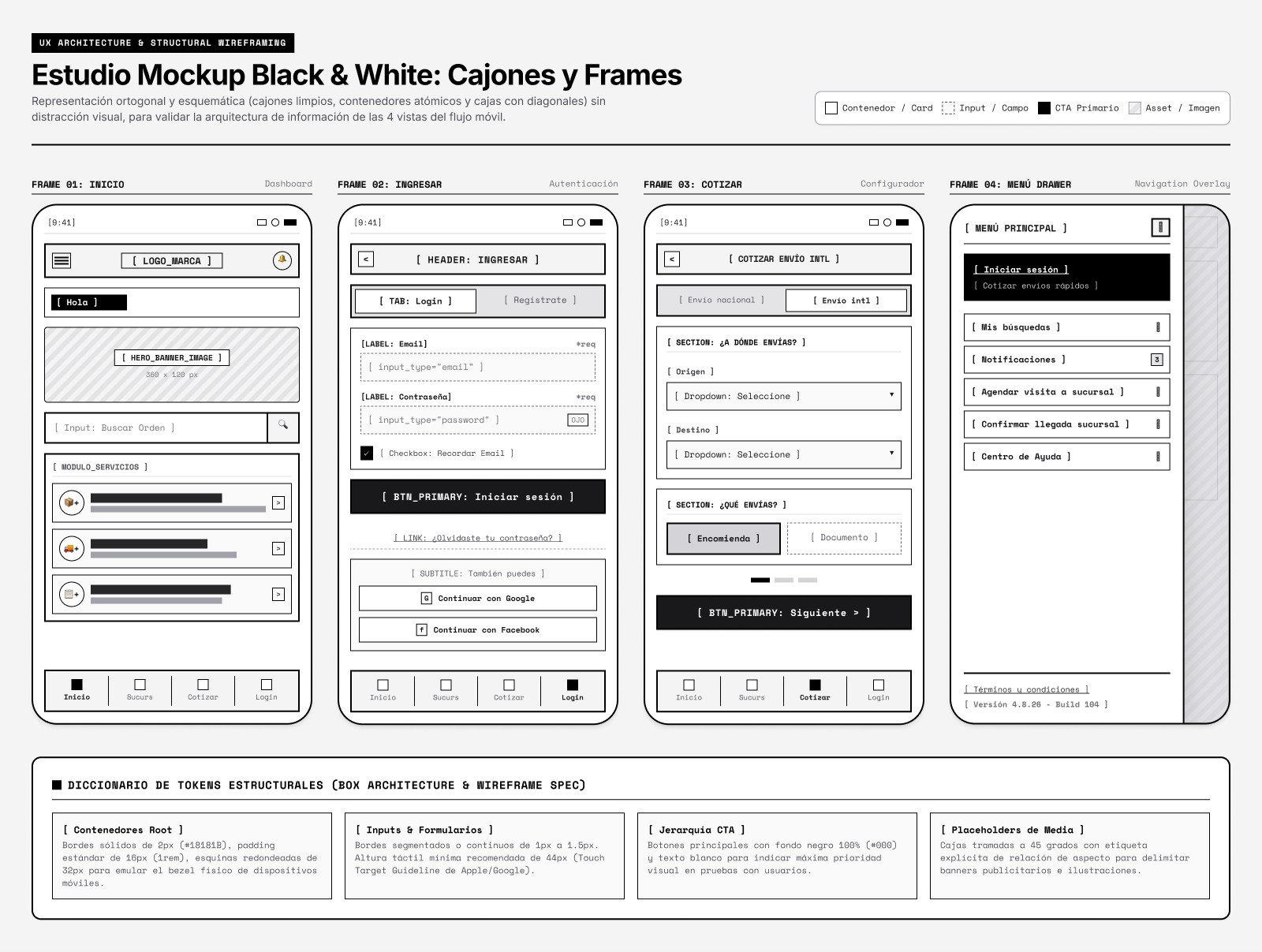
Antes de cualquier color, validé la arquitectura de información de las 4 vistas del flujo móvil (Inicio, Ingresar, Cotizar y Menú) con cajones limpios y un diccionario de tokens estructurales: contenedores, inputs con altura táctil mínima de 44 px, jerarquía de CTA y placeholders de imagen.

Before any color, I validated the information architecture of the 4 mobile views (Home, Sign in, Quote and Menu) with clean boxes and a dictionary of structural tokens: containers, inputs with a 44 px minimum touch target, CTA hierarchy and image placeholders.

Estudio de wireframes en blanco y negro: Inicio, Ingresar, Cotizar y Menú
2

Del wireframe a la alta fidelidadFrom wireframe to high fidelity

La misma pantalla de ingreso en dos etapas: primero la estructura en escala de grises, después los tokens de marca.

The same sign-in screen in two stages: first the grayscale structure, then the brand tokens.

Paso 1 · Wireframe estructuralStep 1 · Structural wireframe
20:34▮▮▮
‹ Ingresar [Wireframe]
LoginRegístrate
Email Input container
usuario@ejemplo.cl
Contraseña Input container
•••••••••••• ◉
Recordar mi email
[ Iniciar sesión CTA ]
También puedes:
Continuar con Google
Continuar con Facebook
InicioSucursalesCotizarIngresar

Valida jerarquía, campos obligatorios, recuperación de clave y acceso con Google/Facebook sin sesgos de color.

Validates hierarchy, required fields, password recovery and Google/Facebook sign-in without color bias.

Paso 2 · UI en alta fidelidadStep 2 · High-fidelity UI
20:344G 85%
‹ Ingresar
LoginRegístrate
Email
rodrigo@ejemplo.cl
Contraseña
•••••••••••• ◉
Recordar mi email
Iniciar sesión
También puedes:
G Continuar con Google
f Continuar con Facebook
InicioSucursalesCotizarIngresar

Primario #F7E300, acción #000000 y neutros con contraste WCAG AA (≥ 4.5:1) en textos y botones.

Primary #F7E300, action #000000 and neutrals with WCAG AA contrast (≥ 4.5:1) on text and buttons.

3

Investigación de usuario y hallazgosUser research & findings

Entrevistas cuantitativas y cualitativas con clientes que envían o retiran paquetes.

Quantitative and qualitative interviews with customers who send or pick up parcels.

👤 User personaUser persona

Rodrigo, 32 · emprendedor e-commerce. Despacha 15 paquetes diarios a sucursales y necesita ver su estado de inmediato. Olvida seguido sus contraseñas y quiere entrar con un toque (Google o biometría).

Rodrigo, 32 · e-commerce entrepreneur. Ships 15 parcels a day to branches and needs to see their status right away. Often forgets passwords and wants one-tap sign-in (Google or biometrics).

⚠️ Puntos de fricciónPain points

  • 68% de abandono al exigir registro con contraseña compleja antes de cotizar.
  • Sin validación en vivo del formato de correo en el teclado móvil.
  • Sin opción «Ver contraseña»: muchos errores de tipeo en pantalla táctil.
  • 68% drop-off when forcing sign-up with a complex password before quoting.
  • No live email-format validation on the mobile keyboard.
  • No "Show password" option: frequent typos on touch screens.

✅ Decisiones de diseñoDesign decisions

  • Acceso con Google/Facebook en el mismo formulario inicial.
  • «Recordar mi email» guardado de forma segura en SecureStore.
  • Validación del correo mientras se escribe y botón «Ver contraseña».
  • CTA negro sobre fondo blanco para máxima claridad.
  • Google/Facebook sign-in right in the first form.
  • "Remember my email" stored securely in SecureStore.
  • Live email validation and a "Show password" toggle.
  • Black CTA on white for maximum clarity.
4

Código: React Native + backend Node.jsCode: React Native + Node.js backend

Cada decisión de diseño llevada al código: validación en vivo, ver/ocultar contraseña, email recordado en SecureStore y un backend que no revela qué correos están registrados.

Every design decision carried into code: live validation, show/hide password, email remembered in SecureStore and a backend that never reveals which emails are registered.
LoginScreen.tsxReact Native
import React, { useState } from 'react';
import { View, Text, TextInput, TouchableOpacity, ActivityIndicator, Alert } from 'react-native';
import * as SecureStore from 'expo-secure-store';
import { login } from '../services/auth';
import { styles } from './LoginScreen.styles';

const EMAIL_RE = /^[^\s@]+@[^\s@]+\.[^\s@]+$/;

export default function LoginScreen({ navigation }) {
  const [email, setEmail] = useState('');
  const [password, setPassword] = useState('');
  const [showPassword, setShowPassword] = useState(false);
  const [remember, setRemember] = useState(true);
  const [loading, setLoading] = useState(false);

  // Validación reactiva: el error aparece mientras se escribe
  const emailError = email.length > 0 && !EMAIL_RE.test(email);

  const handleLogin = async () => {
    if (!EMAIL_RE.test(email) || !password) {
      Alert.alert('Atención', 'Ingresa un correo válido y tu contraseña');
      return;
    }
    setLoading(true);
    try {
      const { token } = await login(email, password);
      await SecureStore.setItemAsync('token', token);
      if (remember) await SecureStore.setItemAsync('email', email);
      navigation.replace('Home');
    } catch {
      Alert.alert('Error', 'Correo o contraseña incorrectos');
    } finally {
      setLoading(false);
    }
  };

  return (
    <View testID="login_screen" style={styles.container}>
      <TextInput
        testID="input_email"
        style={[styles.input, emailError && styles.inputError]}
        placeholder="Ingresa tu email"
        keyboardType="email-address"
        autoCapitalize="none"
        value={email}
        onChangeText={setEmail}
      />
      {emailError && <Text style={styles.errorText}>Revisa el formato del correo</Text>}

      <TextInput
        testID="input_password"
        style={styles.input}
        placeholder="Ingresa tu contraseña"
        secureTextEntry={!showPassword}
        value={password}
        onChangeText={setPassword}
      />
      <TouchableOpacity onPress={() => setShowPassword(!showPassword)}>
        <Text style={styles.link}>{showPassword ? 'Ocultar' : 'Ver'} contraseña</Text>
      </TouchableOpacity>

      <TouchableOpacity testID="btn_submit_login" style={styles.cta} onPress={handleLogin} disabled={loading}>
        {loading ? <ActivityIndicator color="#FFFFFF" /> : <Text style={styles.ctaText}>Iniciar sesión</Text>}
      </TouchableOpacity>
    </View>
  );
}
authService.jsNode.js · Express
const express = require('express');
const bcrypt = require('bcrypt');
const jwt = require('jsonwebtoken');
const { findUserByEmail } = require('../db/users');

const router = express.Router();

// POST /v1/auth — inicio de sesión para clientes móviles
router.post('/v1/auth', async (req, res) => {
  const { email, password } = req.body;

  if (!email || !password) {
    return res.status(400).json({ success: false, message: 'Email y contraseña son obligatorios' });
  }

  try {
    const user = await findUserByEmail(email);
    const valid = user && (await bcrypt.compare(password, user.passwordHash));

    // Mismo mensaje para usuario inexistente o clave incorrecta:
    // evita revelar qué correos están registrados
    if (!valid) {
      return res.status(401).json({ success: false, message: 'Credenciales no válidas' });
    }

    const token = jwt.sign(
      { sub: user.id, email: user.email },
      process.env.JWT_SECRET,
      { expiresIn: '7d' }
    );

    return res.status(200).json({ success: true, token, user: { id: user.id, email: user.email } });
  } catch (err) {
    return res.status(500).json({ success: false, message: 'Error interno del servidor' });
  }
});

module.exports = router;
5

Pruebas automatizadas en Firebase Test LabAutomated tests on Firebase Test Lab

Validación de renderizado y pruebas de punta a punta en una matriz de dispositivos Android físicos.

Rendering validation and end-to-end tests on a matrix of physical Android devices.

Robo Test · exploración autónomaRobo Test · autonomous crawl

El crawler de Google recorre la app, detecta cierres inesperados y captura cada pantalla en distintas densidades.

Google's crawler walks the app, detects crashes and captures every screen across pixel densities.

0 crashes · 12 dispositivos0 crashes · 12 devices

Instrumentación · login E2EInstrumentation · E2E login

Un script escribe en input_email, presiona btn_submit_login y comprueba que se abra la pantalla principal sin latencia anómala.

A script types into input_email, taps btn_submit_login and checks the home screen opens without unusual latency.

Flujo completo · credenciales de pruebaFull flow · test credentials

Matriz de dispositivosDevice matrix

  • Google Pixel 8 · Android 14
  • Samsung Galaxy S23 · Android 13
  • Motorola Moto G Stylus · Android 12
  • Xiaomi Redmi Note 11 · Android 11

100% passed

Ejecución desde Google Cloud SDK (CI/CD)Run from Google Cloud SDK (CI/CD)bash
gcloud firebase test android run \
  --type instrumentation \
  --app ./android/app/build/outputs/apk/release/app-release.apk \
  --test ./android/app/build/outputs/apk/androidTest/release/app-release-androidTest.apk \
  --device model=shiba,version=34,locale=es,orientation=portrait \
  --device model=dm1q,version=33,locale=es,orientation=portrait \
  --timeout 15m \
  --results-bucket=gs://login-redesign-test-artifacts

Cómo usé cada herramientaHow I used each tool

FiFigma

Wireframes en blanco y negro, alta fidelidad y tokens de marca.

Black-and-white wireframes, high fidelity and brand tokens.

⚛React Native

Pantalla de login con validación en vivo, SecureStore y testIDs para las pruebas.

Login screen with live validation, SecureStore and testIDs for testing.

JSNode.js · Express

Endpoint de autenticación con bcrypt y tokens JWT.

Authentication endpoint with bcrypt and JWT tokens.

FBFirebase Test Lab

Robo Test e instrumentación en dispositivos Android reales.

Robo Test and instrumentation on real Android devices.

UXInvestigación UXUX research

Entrevistas, user persona y puntos de fricción que guiaron cada decisión.

Interviews, user persona and pain points that drove every decision.